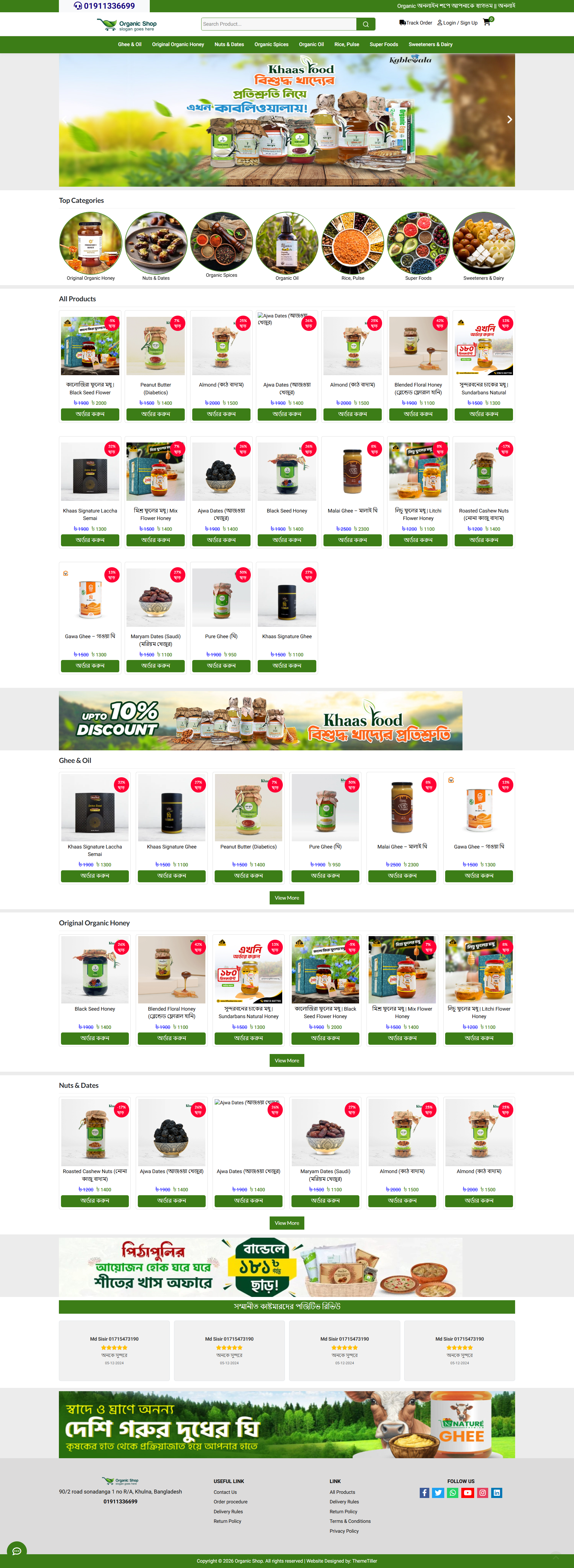
Click to enlarge

Multi-Channel E-Commerce Platform — A Laravel-based online store with WhatsApp, Facebook Messenger, Telegram, and custom live chat integration, multi-payment gateway support, SEO & tracking management, and a full admin panel for orders, products, and site settings.

Multi-Platform E-Commerce System — a complete Laravel-based online store solution with built-in omnichannel customer engagement tools. The system includes a multi-channel live chat widget supporting WhatsApp, Facebook Messenger, Telegram, and custom chat platforms — all configurable with customizable colors from the admin panel. It features a full product catalog with categories, subcategories, and childcategories, advanced order management with dynamic order statuses, multiple payment gateway integrations (Shurjopay, bkash, etc.), SMS gateway and courier API integrations, and comprehensive marketing tools including Facebook Pixel, Google Tag Manager, Google Analytics, and multi-platform tracking (Yahoo Ads, Bing Ads, TikTok, Pinterest). The admin dashboard provides complete control over SEO management, theme colors, dynamic menu/footer managers, page content management, shipping charges, banners & ads, customer management, role-based user permissions, and detailed stock reports. The frontend delivers a responsive mobile-first design with AJAX-powered cart functionality, live search, product quick view, campaign/landing page support, and fixed bottom navigation with WhatsApp integration. Built on Laravel with Blade templating, Font Awesome 6, and Bootstrap 5.
admin url
https://gadgetbdecommerce.themetiller.top/mypanel
user: demo@gmai.com
password: 123456
  • - Responsive mobile-first Bootstrap 5 frontend
  • - Multi-level category product management (category/subcategory/childcategory)
  • - AJAX live search with dropdown
  • - AJAX cart (add, remove, increment, decrement, mini cart)
  • - Product detail page with image gallery, colors, sizes, video
  • - AJAX quick view modal
  • - Hot deals, flash sales, featured products
  • - Campaign/landing page system
  • - Dynamic homepage with sliders, banners, category-wise products
  • - POS (Point of Sale) system
  • - Bkash tokenized checkout integration
  • - Shurjopay payment gateway integration
  • - Cash on Delivery
  • - Configurable SMS gateway (order confirmation, OTP, password reset)
  • - SteadFast courier API integration
  • - Pathao courier API integration
  • - Multi-platform live chat widget (WhatsApp, Messenger, Telegram, Custom)
  • - Customizable chat button and platform colors from admin
  • - Google Analytics tracking
  • - Facebook Pixel management (multiple pixels)
  • - Google Tag Manager support
  • - Yahoo Ads, Bing Ads, TikTok Pixel, Pinterest Tag tracking
  • - Unified multi-platform tracking manager
  • - Customer registration with phone OTP verification
  • - Customer forgot password via SMS OTP
  • - Customer order history, invoice, order tracking
  • - Admin login-as-customer
  • - IP allow/block security
  • - Admin lock screen
  • - Role & permission management (Spatie)
  • - Admin user management
  • - Dynamic menu manager (multi-level)
  • - Footer link manager
  • - SEO manager (per-page meta title, description, keywords, OG, canonical)
  • - Theme color customizer (30+ CSS variables)
  • - Content/key-value editor (UI text customization)
  • - Custom static page builder (CKEditor)
  • - Banner & ads management with categories
  • - Product review moderation
  • - Order status workflow
  • - Shipping charge management
  • - Brand, color, size attribute management
  • - Bulk product price editor
  • - Bulk courier order assignment
  • - Stock report with filters
  • - Order report with filters
  • - Social media link management
  • - Contact information management
  • - General site settings (logo, favicon, meta, verification codes)
  • - Coupon/discount system (session-based)
  • - Order invoice and print
  • - Database migrations and seeders included

System Requirements

Ensure your server meets these requirements before purchase.

PHP Version ^8.0.2
Laravel Version ^9.19
Database MySQL 5.7+ / MariaDB 10.2+
Web Server Apache (mod_rewrite) or Nginx
PHP Extensions BCMath, Ctype, Fileinfo, JSON, Mbstring, OpenSSL, PDO, Tokenizer, XML, cURL, GD/Imagick
Node.js ^16 (for Vite asset compilation)
NPM ^8
Composer ^2
Required Packages Laravel Shopping Cart, Spatie Permission, Intervention Image, Guzzle, Laravel Toastr, Shurjopay, LaravelCollective HTML
Storage 100MB+ for product images, settings, banners
Server Config storage/ and bootstrap/cache/ writable, URL rewriting enabled
SSL Recommended for payment gateway & live chat integrations
Cron Job (Optional) For scheduled tasks if needed
Mail Server SMTP details required for transactional emails
Version history for Gadget BD Ecommerce
# Admin Panel User Guide
## How to Manage This Script From Admin
---
### 1. Accessing the Admin Panel
Navigate to `http://your-domain.com/mypanel` and log in with your admin credentials. After login you'll see the Dashboard with key metrics: Total Orders, Today's Orders, Total Products, Total Customers, latest orders, and sales charts.
---
### 2. Dashboard Overview
| Metric | Description |
|--------|-------------|
| Total Orders | All orders placed to date |
| Today's Orders | Orders placed today |
| Total Products | All products in the catalog |
| Total Customers | All registered customers |
| Latest Orders | Last 5 orders with status |
| Latest Customers | Last 5 registered customers |
| Sales Chart | Daily sales revenue graph |
| Delivery Chart | Delivery success rate (radial) |
---
### 3. Managing Orders
**Navigate to:** Sidebar > Orders
- **All Orders** — View all orders by status (Pending, Processing, Shipped, Delivered, Cancelled). Each status is shown as a sub-menu item.
- **Create POS Order** — Create manual orders from the admin panel (POS system).
- **Order Actions:** View invoice, edit order, print invoice, update status, process bulk courier shipments.
- **Invoice:** Click the invoice icon to generate and print a customer invoice.
---
### 4. Managing Products
**Navigate to:** Sidebar > Products
#### 4.1 Product Manage
- **Add Product:** Click "Add Product" button, fill in name, category, price, stock, images, description, etc.
- **Edit Product:** Click the edit icon on any product row.
- **Bulk Actions:** Select multiple products to mark as Deal, Feature, Active, or Inactive.
- **Price Edit:** Bulk update product prices from a single screen.
#### 4.2 Categories
- Manage Categories, Subcategories, and Childcategories (hierarchical product classification).
- Each level supports create, edit, activate/deactivate.
#### 4.3 Brands
- Add and manage product brands.
#### 4.4 Colors & Sizes
- Define available colors and sizes for products (used during product creation).
---
### 5. Managing Reviews
**Navigate to:** Sidebar > Reviews
- **Pending Reviews** — Approve or reject customer product reviews.
- **All Reviews** — View, edit, or delete all reviews.
- A badge shows the number of pending reviews.
---
### 6. Landing Page & Campaigns
**Navigate to:** Sidebar > Landing Page
- **Campaign** — Create promotional campaigns with banners, offers, and landing pages.
- Add campaign images, set validity dates, and link to products.
---
### 7. Managing Users & Permissions
**Navigate to:** Sidebar > Users
#### 7.1 Admin Users
- Add, edit, activate/deactivate, or delete admin panel users.
- Assign roles to control what each admin can access.
#### 7.2 Roles
- Create roles (e.g., Super Admin, Manager, Editor).
- Assign permissions to each role.
#### 7.3 Permissions
- Define granular permissions (e.g., "create product", "edit order", "delete customer").
- Permissions are assigned to roles, roles are assigned to users.
#### 7.4 Customers
- View all registered customers.
- Edit customer details.
- **IP Block** — Block customer IPs to prevent access.
- **Admin Login** — Log in as a customer to see the store from their perspective.
---
### 8. Site Settings
**Navigate to:** Sidebar > Site Setting
#### 8.1 General Setting
- Site name, address, phone, email.
- Upload logos (dark logo, white logo, favicon).
#### 8.2 Pixels Setting
- Configure Facebook Pixel and Google Ecommerce tracking pixels.
#### 8.3 Social Media
- Add/edit Facebook, Twitter, Instagram, YouTube, LinkedIn links for the store footer.
#### 8.4 Contact
- Update contact page information (address, phone, email, map embed code).
#### 8.5 Create Page
- Create custom static pages (About Us, Privacy Policy, Terms & Conditions, etc.).
#### 8.6 Shipping Charge
- Define shipping charges by location/area.
- Set free shipping thresholds.
#### 8.7 Order Status
- Define custom order status labels (e.g., Pending, Processing, Shipped, Delivered, Cancelled, Returned).
#### 8.8 Theme Settings
- Customize colors: primary color, hover color, background color, navbar color, footer color.
- Preview changes live.
#### 8.9 Menu Manage
- Build and organize navigation menus for the storefront.
- Drag and drop to reorder menu items.
- Link to categories, pages, or custom URLs.
#### 8.10 Footer Link
- Add/edit links displayed in the website footer.
- Organize into groups/columns.
#### 8.11 Content Settings
- Edit homepage sections: hero banners, featured categories, promotional blocks, etc.
---
### 9. API Integration
**Navigate to:** Sidebar > API Integration
#### 9.1 Payment Gateway
- Configure bKash (Merchant API).
- Configure Shurjopay payment gateway.
- Enable/disable payment methods.
#### 9.2 SMS Gateway
- Configure SMS provider for order notifications.
#### 9.3 Courier API
- Configure Pathao courier integration for automated shipping.
- Set API tokens, store locations, and delivery pricing.
---
### 10. Tracking Codes
**Navigate to:** Sidebar > Tracking Codes
| Tracker | Purpose |
|---------|---------|
| Tag Manager | Google Tag Manager container ID |
| Pixel Manage | Facebook/Google Ads conversion pixels |
| Bing UET | Bing Universal Event Tracking |
| Yahoo Tracker | Yahoo Ads tracking |
| LinkedIn Insight | LinkedIn Insight Tag |
Each tracker lets you add the tracking ID/code and activate/deactivate it.
---
### 11. Banner & Ads
**Navigate to:** Sidebar > Banner & Ads
- **Banner Category** — Create banner categories (e.g., Homepage Main, Sidebar, Popup).
- **Banner & Ads** — Upload banners, link to products/categories, set display order and active dates.
---
### 12. Reports
**Navigate to:** Sidebar > Reports
| Report | Description |
|--------|-------------|
| Stock Report | View product stock levels, low-stock alerts |
| IP Block | List of blocked IP addresses |
| Order Reports | Filter orders by date range and status for sales analysis |
---
### 13. Quick Tips
- **Notifications:** The bell icon in the top bar shows pending orders. Click to view or mark as read.
- **Bulk Actions:** Use checkboxes and the dropdown menu to perform actions on multiple items at once.
- **Search:** Use the search bar at the top of each index page to filter products, orders, customers, etc.
- **Visit Site:** Click "Visit Site" in the top bar to open the customer-facing store in a new tab.
- **Lock Screen:** Use the user menu > Lock Screen to temporarily lock the admin panel (requires password to unlock).
- **Change Password:** User menu > Change Password to update your admin password.
- **Screen Reader Friendly:** All action icons have tooltips on hover.
---
### 14. Troubleshooting
| Issue | Solution |
|-------|----------|
| Can't log in | Check credentials or use "Forgot Password" on the login page |
| Page not loading | Clear browser cache or check server PHP version (8.0+) |
| Images not showing | Verify file permissions on `public/uploads/` directory |
| Orders not updating | Check order status configuration in Site Setting > Order Status |
| Payment not working | Verify API credentials in API Integration > Payment Gateway |
| Courier not integrating | Check Pathao API token and store location setup in API Integration > Courier API |
---
### 15. URL Reference
| Page | URL |
|------|-----|
| Admin Login | `/admin` |
| Dashboard | `/admin/dashboard` |
| Products | `/admin/products` |
| Orders | `/admin/orders/all` |
| Customers | `/admin/customers` |
| Settings | `/admin/settings` |
| Reports | `/admin/stock-report` |
---
*This guide covers all major features of the admin panel. For additional help, contact the system developer.*
+ Thought: 198ms
Created ADMIN_GUIDE.md in the project root — a comprehensive admin user guide covering all 14 sections of the panel: Dashboard, Orders, Products, Reviews, Campaigns, Users & Permissions, Site Settings, API Integration, Tracking Codes, Banners, Reports, quick tips, troubleshooting, and URL reference.

No reviews yet

Be the first to review this product.

Sign in to leave a review.

What's Included

Store Frontend
- Responsive mobile-first design (Bootstrap 5)
- AJAX live search with dropdown results
- Multi-level category navigation (category → subcategory → childcategory)
- Product grid with sorting, filtering (price, subcategory, sold items)
- Product detail page with image gallery, color/size selection, video, reviews
- AJAX quick view modal
- Hot deals, flash sales, featured products sections
- Dynamic homepage with sliders, banners, category-wise products
- Campaign/landing page support
Cart & Checkout
- AJAX add-to-cart, increment, decrement, remove
- Mini cart dropdown with subtotal
- Shipping address with district/area cascading dropdowns
- Shipping charge selection
- Multiple payment methods: Cash on Delivery, bKash (tokenized checkout), Shurjopay
- Coupon/discount via session
- Order success page with invoice
Customer Account
- Phone-based registration with OTP verification (SMS)
- Login with OTP, forgot password via OTP
- Order history, invoice download, order notes
- Profile edit, change password
- Order tracking by phone + invoice ID
Admin Panel (35+ modules)
- Dashboard with KPIs and sales charts
- Product management with bulk price/status/feature edits
- Category, subcategory, childcategory management
- Brand, color, size management
- Order management with status filtering, invoice, print, bulk actions
- POS (Point of Sale) system
- Customer management with admin login-as-customer
- Role & permission management (Spatie)
- Admin users management
- Order status workflow management
- Shipping charges CRUD
- Banner & ads management with categories
- Campaign management with product associations
- Product reviews moderation
- Custom static page builder (CKEditor)
- Dynamic menu manager (multi-level)
- Footer link manager (two columns)
- Theme color customizer (30+ CSS variables)
- General site settings (logo, favicon, meta, verification codes)
- Content/key-value string editor (effectively UI localization)
- SEO manager (per-page meta, OG, canonical)
- Social media link management
- Contact information management
- Lock screen security
- IP allow/block management
Live Chat (Multi-Platform)
- WhatsApp (click-to-chat)
- Facebook Messenger
- Telegram
- Custom URL/embed
- Customizable colors per platform + main button
- Floating toggle widget with animated panel
Integrations
- Payment: bKash tokenized checkout, Shurjopay, COD
- SMS: Configurable gateway for order confirmation, OTP, password reset
- Courier: SteadFast (bulk), Pathao (city/zone/area + order creation)
- Analytics: Google Analytics, Facebook Pixel, Google Tag Manager, Yahoo Ads, Bing Ads, TikTok Pixel, Pinterest Tag, custom code
- Pixels: Multiple Facebook Pixel IDs management
- GTM: Multiple container IDs management
- Multi-platform tracking: 8 platforms via single unified manager
Security & Middleware
- IP allow/block middleware
- HTTP referrer check middleware
- Admin session lock
- Admin login-as-customer
- CSRF protection, Sanctum auth
Admin Tools
- Stock report with date/user/category filters
- Order report with filters
- Bulk price editor
- Bulk courier assignment
- Database migrations & seeders

Gadget BD Ecommerce

Exclusive Laravel Script Licensed Featured v2.0
0.0 | 0 reviews | 2 sales
15,000.00 -93% 1,000.00

You save 14,000.00

One-time payment — no subscription

Version

2.0

File Size

67.6 MB

Updated

Jun 15, 2026

Downloads

0

Live Demo

Secure Payment

256-bit SSL encrypted checkout

Instant Access

Download immediately after purchase

Money Back

7-day satisfaction guarantee

Share This Product

Related

You May Also Like

Organic Shop
Licensed 93% OFF

Organic Shop

This is a Laravel controller for admin user management — handles CRUD operations (create, read, update, delete) on the users table. It validates input, hashes passwords, processes profile images to resized WebP via Intervention Image, assigns Spatie roles, and includes status toggle (active/inactive). All actions are guarded by Spatie permission middleware.

(0)
৳15,000.00 ৳1,000.00

Price

15,000.00 1,000.00

Chat with us

We typically reply in minutes